Bytrionly
Slate Series
Slate Series
Couldn't load pickup availability
Share
1. Problem Statement
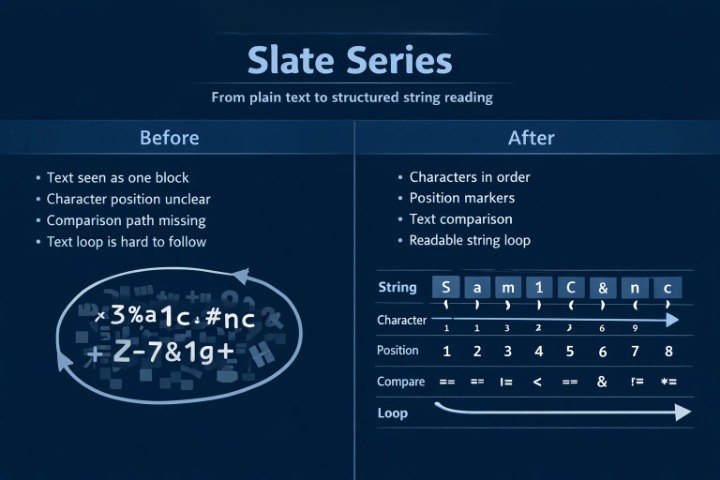
After working with numbers and arrays, many learners meet a new type of data: text. At first, strings may seem simpler than arrays, but they also contain order, characters, positions, and processing rules. A learner may understand how a number or a single character works, but feel unsure when reading a full string, comparing two text values, or changing part of the content. Another difficulty appears when a string needs to be processed with a loop, when separate characters need to be checked, or when text needs to be passed into a function. Slate Series helps learners study text values in C++ programming as an ordered topic, not as a group of random rules.
2. Solution
Slate Series presents work with strings through an ordered review: what a text value is, how it is stored, how to read characters, and how to perform simple actions with them. The materials explain the difference between a single character and a string, and show examples of comparison, search, and text changes. The learner sees how familiar topics — conditions, loops, functions, and arrays — help when working with text data. Each section is built to explain the idea first, then show a code fragment, and then review the execution logic. This format helps learners move calmly from numerical examples to text-based tasks.
3. What’s Inside
Slate Series includes learning materials that continue the path after Arc Guide and focus on working with strings in C++ programming. The main idea of this tier is to show that text in code has its own structure, and that each character can be part of a wider logic. The materials are created so the learner can gradually move from simply storing a string to analyzing, comparing, changing, and using it in functions.
The first section introduces the idea of a string. It explains how a string differs from a number, a character, or an array of numerical values. The learner sees examples where text is used for messages, names, short answers, labels, and simple data that is not meant for calculation. The materials explain that a text value also has order: characters stand one after another, and each of them can be reviewed separately.
The second section focuses on separate characters. It explains how a character can be part of a string, how it can be read by position, and why it is important not to confuse a character with a full text value. The examples show how to get the first letter, check a certain sign, compare a character with an expected value, or use it in a condition. This section helps show a string not as one solid fragment, but as a sequence of smaller elements.
The third section reviews string length and character positions. The learner studies how to understand how many characters a string contains, how not to move beyond its boundary, and why a character position matters during processing. The materials explain how string length connects with loops, checks, and searching for a needed character. The examples show how to move through the full text, count characters of a certain kind, or determine whether a string contains a needed part.
The fourth section is about comparing strings. It explains how a program can check whether two text values are the same, whether they contain a needed group of characters, or whether an entered value matches an expected option. The learner sees examples where conditions are used not only for numbers, but also for text. This helps widen the understanding of conditional logic and shows that checks can work with different types of data.
The fifth section explains simple string changes. The materials show how to add text parts, combine several values, form a new string, and change separate characters within small examples. The learner sees how text can be built gradually, in the same way a numerical result can change while a program runs. There is a separate explanation of why such examples should be read attentively, because even a small character change can change the whole result.
The sixth section combines strings with loops. It shows how a loop can move through characters, check each one, and perform a certain action. The examples include counting letters, searching for a specific character, skipping certain signs, or creating a new text value from part of a string. The learner sees the familiar topic of repetition in a new context: now a loop works not only with numbers or arrays, but also with text.
The seventh section focuses on functions for text work. The materials show how to move a string check into a separate function, how to pass a text value, and how to return a check result or a formed string. This helps connect previous topics with the new area. The learner sees that functions can be useful not only for numerical calculations, but also for checking and preparing text values.
The eighth section contains practice tasks. They are built around short text scenarios: count characters, find a needed letter, compare two strings, change part of text, and explain the result of a code fragment. Some tasks ask the learner not only to write code, but also to describe what happens to the string at each stage. This helps show the order of actions and the connection between characters, conditions, and loops.
Slate Series also includes summary notes after each section. They remind the learner how to tell a character from a string, how positions work, why text length matters, how to read a loop that moves through characters, and how a function can work with a text value. These notes can be used for review or before moving to later tiers where more detailed data structures and wider learning examples appear.
4. Who Is This For?
Slate Series is suitable for learners who already know basic C++ programming constructions, arrays, and functions, but want to study text handling more carefully. This tier fits those who understand numerical examples but feel unsure when strings, characters, positions, and text comparisons appear in code.
The materials also suit those who want to read code with text logic more attentively. When it is difficult to understand which character is being checked, why a string changes, or how a loop moves through text, Slate Series helps divide such examples into smaller parts. The tier may be useful for independent study, string topic review, or preparation for later sections where text is combined with structures, files, and larger examples.
5. What You’ll Learn
- How the idea of a string works in C++ programming.
- How a string differs from a single character.
- How to read characters by position.
- How to determine the length of a text value.
- How to compare strings and characters.
- How to use conditions for text checks.
- How to move through a string with a loop.
- How to change separate parts of text.
- How to create functions for working with strings.
- How to explain the result of a code fragment that includes text, a loop, and a check.
6. 30-Day Refund Note
Slate Series includes a 30-day period during which a refund request may be submitted according to the Bytrionly store terms. The request is reviewed under the rules described in the store policy. Before placing an order, we recommend reviewing the tier description, the list of materials, and the topics included in this series. If clarification is needed about the content or learning format, the Bytrionly team can respond through the contact page.
- 📘 Digital file available after purchase
- 📚 Long-term availability
- 🔐 Secure checkout
- 🗓️ Content updated in 2026
Self-paced learning overview
1. Are these courses suitable for beginners in C++ programming?
1. Are these courses suitable for beginners in C++ programming?
Yes, Bytrionly materials are organized so a learner can gradually work through the topic without being overloaded by terminology. The lessons explain basic concepts, code examples, syntax logic, and the order of actions. Each tier has a different scope of materials, so learners can choose a format that matches their own study pace.
2. What is included in the learning materials?
2. What is included in the learning materials?
Depending on the tier, the materials may include topic explanations, code examples, structured modules, independent practice tasks, short notes, review sections, and practical examples. All materials are built around C++ programming and arranged as a step-by-step learning path.
3. Can I study at my own pace?
3. Can I study at my own pace?
Yes, Bytrionly materials are suitable for independent study at a comfortable rhythm. You can return to topics, repeat examples, review explanations, and work with code as many times as needed for better understanding.
4. How are the tiers different from each other?
4. How are the tiers different from each other?
The tiers are arranged in ascending order by content volume, topic depth, and number of learning sections. The first tiers introduce the basics of C++ programming, while the later ones add more topics, tasks, examples, and structured materials for deeper study.